
Computer Tech Tips

Send a Garmin Map to Your Garmin Computer


iPhone

  1. On your phone, tap the map you want. Once in GarminConnect, tap the Send to Device icon.
  1. Select the computer to send it to. Sync your phone with GarminConnect and the course will transfer.


Android


As above, tap the map you want and allow it to open in GarminConnect.
  1. If you don't see the Send to Device button, log into GarminConnect and try again.
  1. Return to GarminConnect and tap the Sync button to complete the transfer.


Send a Garmin Map to Your Wahoo Computer
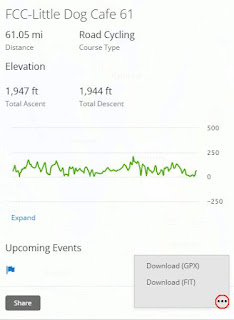


On a computer

Open map in Garmin, click the kebab. and select Download GPX

Then:
  • Email the file to yourself and open on your phone
OR 
  • Log in to your RideWithGPS dashboard
  • Click on Upload
  • Browse to or drop the GPX file and save the route 


On your phone:

  • Tap the attachment and open with the ELEMNT app
  • Name the route 

With your Wahoo computer connected to the phone:

  • Tap to open the Overview
  • Tap Select/Select Route to sync

No comments: